
Optimise collaboration, buildability and insights
Forma (formerly known as Autodesk Construction Cloud) brings together everything you need for your construction projects.
Book a demoTake full control of the project – it’s easier than you think!
Whether you are a client, architect, consultant or contractor on a construction project, you probably know the feeling of frustration and anger when a project does not go as planned.
For example, if the budget is exceeded. Again. Or if the printed 2D drawings did not contain the latest changes. So now you have to make another trip back to the office, print new drawings and go back to the construction site.
Maybe you tried to order too many materials for your project. That's money that could have been saved - and a huge waste of resources. There are many challenges in a construction project. You know them well.
Today, much more work is done in project teams and professional groups, and you need transparency, overview and more time to use your professional skills instead of worrying about versions and data quality.
Forma (formerly known as Autodesk Construction Cloud) helps you overcome the challenges commonly faced on your projects.
A unified solution
With Forma, you get visibility and control over the entire project and a single platform to streamline all phases of a construction project. Your models can be visualised on your tablet and all data is synchronised in real time with the latest version.
This ensures that your productivity increases significantly while improving the quality and consistency of all your work. Whether you are a developer, architect, consultant or contractor, Forma gives you a single solution to collect data in one place - and facilitates collaboration across parties and phases of the project.
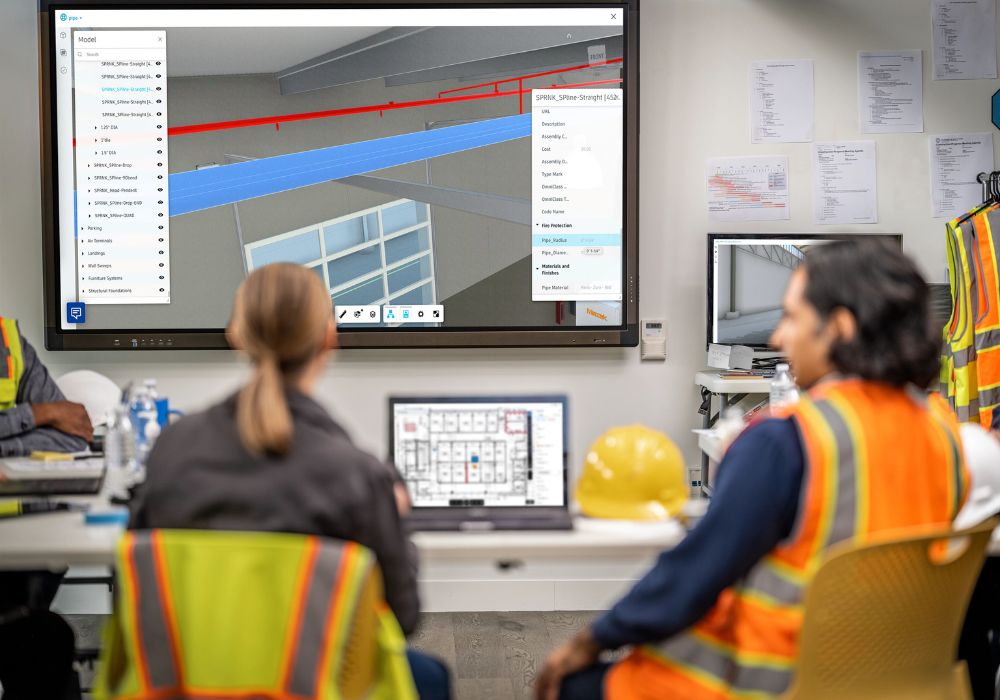
Work anywhere, anytime, on any device

Cost Control
Our all-in-one solution provides a comprehensive overview and control over the entire process, helping you maintain and even improve your budget.

Real-time data increases quality
Access the latest versions of digital files and documents—such as BIM models and PDFs—quickly via the cloud, resulting in higher-quality projects.

Save time in the processes
Streamline outdated manual processes for printing and quality assurance, allowing you more time to apply your professional skills effectively.
Building trust and collaboration between teams
No matter your role in a construction project, Forma reduces risk, enhances quality, and optimises your chances of completing projects on time and within budget. Automate previously manual tasks while gaining visibility into every detail of your project.
Contractor
Execute a successful project by connecting all teams from design to execution. Leverage material from the design phase and streamline your documentation and quality assurance.
Advisor
Collaborate seamlessly on 2D and 3D designs wherever you are. Streamline your collaboration during the design phase and continuously work on quality assurance of your BIM models.

Builders
Take ownership and manage the project from start to finish with full transparency. Break down the usual silos and use data to make better-informed decisions.
Learn More
Who uses Forma Design Collaboration?
Project Managers can use the platform to oversee comprehensive project details and coordinate tasks effectively.
Project Architects can employ real-time collaboration to refine designs and ensure architectural integrity.
BIM Leads can manage integrated BIM processes, facilitating smooth multi-disciplinary interactions and model coordination.
Digital Practice Managers can oversee digital strategy implementation, optimising design data management and project workflow integrations.
Construction Engineers can leverage the platform for detailed construction planning and on-site execution, ensuring adherence to design specifications.
What is Forma Design Collaboration Used For?
Forma Design Collaboration connects AEC teams on a common data environment within a BIM collaboration platform. It improves and simplifies communication, expedites project timelines, and minimises requests for information (RFIs), streamlining project execution.
What are the benefits of using Forma Design Collaboration?
Secure Project Data Management
Users can control project data securely, monitor progress, and manage information flows effectively.
Version Control and Accountability
Streamline document management and project lifecycle integrity. View changes, hold teams accountable, and access or revert to previous versions at any time.
Common Data Environment
Reduces errors and omissions as all team members work from the same, updated project data.
Real-Time Updates
Users can see updates and changes from each stakeholder, improving coordination and decision-making.
Cost and Time Efficiency
Forma Design Collaborate does not require additional server hardware, deployment, and support. This helps save cost and hardware migration time while enhancing scalability.
Reduced Rework and Change Costs
Helps reduce lost revenue due to rework and changes, ensuring projects stay on budget.
Is Forma Design Collaboration Part of the AEC collection?
Yes, Forma Design Collaboration is included in the Autodesk AEC Collection. This integration provides users with a comprehensive suite of tools that enhance collaboration and project management across various disciplines within the construction industry.
Learn more
Key Features of Forma Takeoff
Cloud-based Document Management
Using Forma's unified platform, facilitate collaboration with simplified access to construction documents, drawings, and 3D models. Enjoy real-time updates, ensuring all team members are working with the most current data.
Document Version Control
Receive clear notifications when document sets are updated, ensuring estimating teams always work off the latest document set. This feature maintains consistency and accuracy across all project documents, reducing errors and rework.
Cloud-Based Multi-user Access
Multiple estimators can access duplicate project files simultaneously to review and perform 2D and 3D take-offs. This collaborative approach accelerates the takeoff process and ensures cohesive project management.
Cloud-Based Design Review
Enjoy cloud-based access to construction drawings, documents, and models in a centralised location. This empowers estimators to perform a more structured design and project review, helping them understand complexities to generate a highly competitive bid that identifies issues early in the project.
Simplified 2D Take-off
Easily capture project scope with linear, count, and area take-off tools. Draw take-off once and generate multiple quantities for increased time savings.
Automated 3D Take-off
Get instant access to quantities from the BIM model for tremendous time savings and project scope visualisation. This automated process increases accuracy and streamlines the takeoff process.
Aggregate 2D+3D Take-off
Take-off types can be used across 2D and 3D take-off, allowing teams to access aggregate quantities from 2D drawings and models in a highly organised and customisable view.
Multiple Classifications
Select from predefined classification systems or upload custom classifications across your projects. This feature supports multiple classifications for material breakdown, enhancing the accuracy and detail of quantity takeoffs.
Multiple Quantities Output
Choose between imperial or metric measurement systems based on project requirements. Generate multiple quantities from a single takeoff, ensuring flexibility and accuracy in construction planning and estimating.
Formula Based Quantities
Use custom formulas to generate complex quantities in both 2D and 3D. Autodesk’s formula checker ensures confidence and precision in takeoff calculations, supporting detailed project estimations.
Connection to Estimating Solutions
Aggregated 2D and 3D quantities can be rolled up by classification, type, and material for seamless integration with estimating solutions. This feature enhances architecture and construction project workflows, ensuring accurate and efficient cost estimation.
What are the benefits of Forma Takeoff?
1.Perform precise 2D take-offs and generate automatic quantities from 3D models within a single solution.
2. Ensure quantities are always current by leveraging a centralised document management environment.
3. Maximise team collaboration and visibility into project scope to reduce costs and win more work.
4. Utilise Forma’s unified platform for streamlined processes and improved efficiency.
5. Produce higher quality estimates faster, empowering your team to deliver competitive bids confidently.
How do I access Forma Takeoff?
To access Forma Takeoff:
- Navigate to your project list.
- Select a project to go to Takeoff home, the overview page for Forma Takeoff.
- If you don't have Forma Build, accept the project invite - this directs you to the Forma Data Management files tool.
- Use the product picker drop-down menu in Docs to navigate to Autodesk Takeoff.
How much does Forma Takeoff cost?
The cost of Forma Takeoff varies depending on your organisation's subscription plan and specific needs. Don’t hesitate to contact us for detailed pricing and personalised assistance.
Autodesk TANDEM
Autodesk Tandem is a cloud-based digital twin technology platform. It enables projects to remain digital, transforming rich data into business intelligence. By harnessing BIM data throughout the process, AEC firms can create and hand over a digital twin to building owners and operators. The easily accessible, contextual, and insightful data they receive makes for ready-to-go operations.
- Seamlessly import BIM models to create comprehensive digital replicas.
- Define detailed digital twin asset information requirements for precise data integration.
- Capture and map non-structured parameters to structured data for consistency.
- Adjust asset data directly in Autodesk Tandem or through Microsoft Excel.
- Monitor and track all data changes to maintain accuracy.
- Integrate real-time operational data for continuous monitoring and optimisation.
- Use predictive analytics for proactive maintenance.
- Improve facilities management with comprehensive data monitoring.
Autodesk Assemble
Autodesk Assemble allows construction professionals to condition, query, and connect BIM data to key workflows. Utilise design reviews, take-offs, estimating, change management, and value engineering to reduce risk and improve efficiencies during project planning and execution.
Assemble enables construction teams to group, sort, filter, and condition model-based quantities to create fast, accurate, and highly visual quantity surveys, which can be easily formatted and connected to any estimate.
- Provide the entire project team with access to the model & drawings to quickly group, sort, & filter quantities & associated meta-data.
- Improve work in place (WIP), lookahead, status tracking, & inventory management workflows when accessing specific model views by trade or scope.
- Instant access to complete project inventory to easily organise project data by user defined parameters such as bid package, locations, phase, WBS, or work activity codes.
- Access specs & other project documents from Forma directly in the Assemble model to identify, track, & resolve project issues quicker & with greater transparency.
Assemble allows BIM experts to turn a design model into a construction-ready model that can be easily broken down into relevant scopes for downstream activities. Using model conditioning workflows, teams can add construction data to the model and assist with classifying and organising project data.
Forma for Model Management (formerly known as Model Management Bundle)
Forma for Model Management offers, in addition to the foundation from Forma, several advanced features for handling large and complex models. It can therefore be a good match for customers who need extended functionality. The package also includes Recap Pro, Navisworks, Assemble and Tandem.



Forma demo, licence and pricing information
Are you looking for a Autodesk Forma licence and want to know how much it costs or how to book a demo?
Pricing
Pricing varies based on the length of the contract and the number of licences requested. Costs may also fluctuate due to Autodesk pricing updates.
To receive a free quote with the updated price, fill out the form on the side and we will contact you as soon as possible.
Demo
Book a free demo with our visualisation experts. Fill out the form and we will contact you to schedule your demo.
Why buy from NTI UK?
- NTI is the largest Autodesk partner in Europe (Platinum Partner) and offers all products in the Autodesk portfolio.
- With our developers, we can tailor the solutions to your needs.
- Our consultants have an industrial background and support you throughout the entire value chain - from installation and distribution to training and support.
- Access to NTI's proprietary solutions for optimising, automating and optimising the use of existing Autodesk software.
Contact Us

Director
+353 18542947