
Important change in Autodesk Platform Services (APS)
January 2026Action required by January 16, 2026
Autodesk has changed the business model for Autodesk Platform Services (APS) – the platform used for integrations, automation and custom solutions in, among others, Autodesk Vault, PLM and Autodesk Construction Cloud.
The change applies to all customers who use apps or integrations based on APS – even if the solution is provided by a partner or is only used “in the background.”
What does that mean to you?
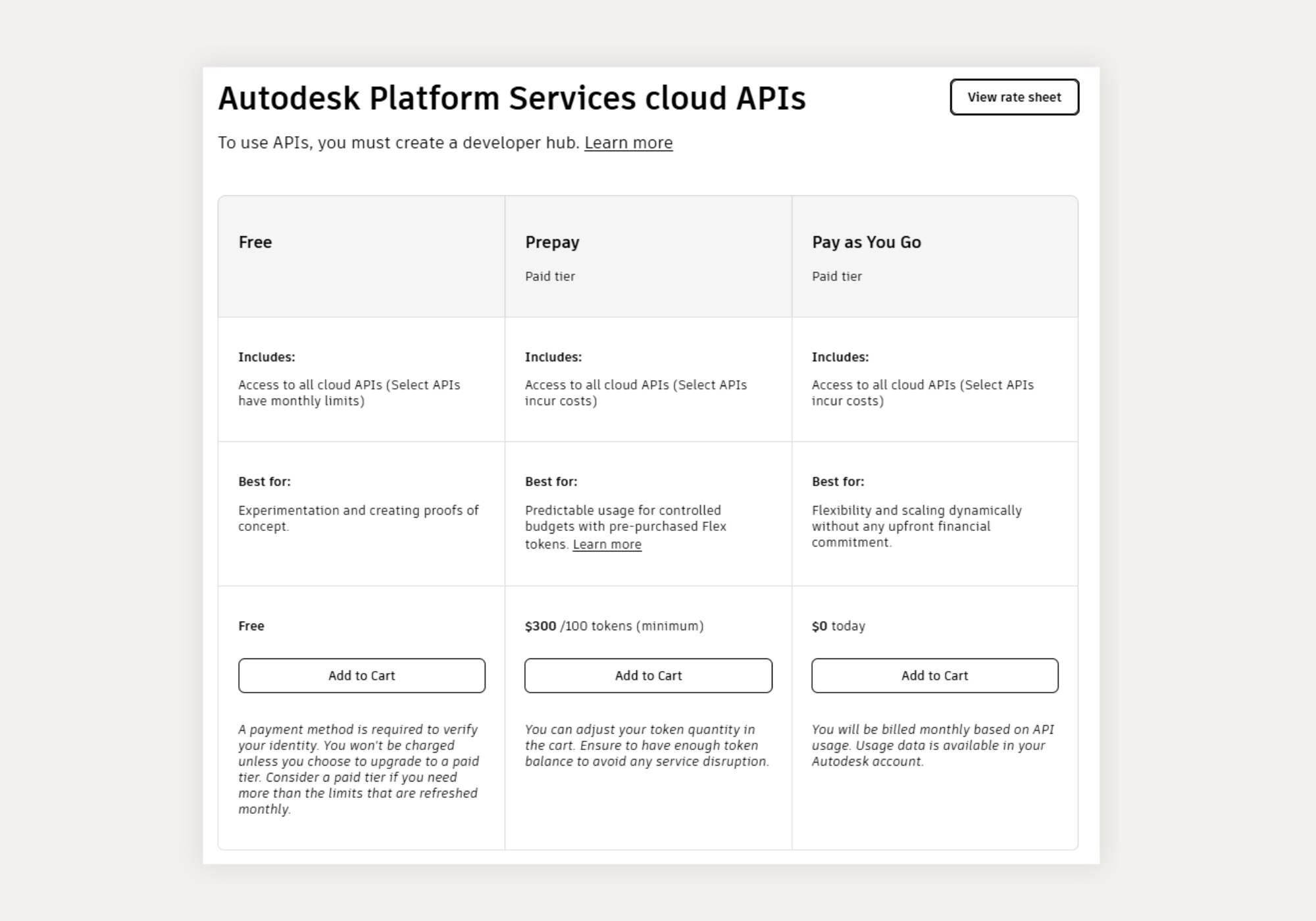
Autodesk has introduced a new two-tier model for APS since December 8th:
Free – free access with monthly usage limits
Paid – paid access if usage exceeds limits
To avoid disruption of your integrations, some simple, but important, steps need to be taken.
Who is affected?
This change is particularly relevant for companies that use:
- Autodesk Vault Jobs and Vault Integrations
- PLM integrations
- Autodesk Construction Cloud integrations
- Configuration and integration solutions in general
- Custom-developed add-ins, scripts or special applications
- Viewers or system connectors based on APS
Many customers have already received notification directly from Autodesk – but not all, which is why we are sharing the information here.
Key details
What you need to do:
In order for your APS-based solutions to continue to function, you must take action no later than January 16. You must do the following:
- Choose an APS offer (Free or Paid)
- Create an APS Developer Hub in the Autodesk Admin Console
- Move existing apps/integrations into the Developer Hub
If this is not done by the deadline, Autodesk may temporarily close API access, which may mean that integrations and automations will stop.
What is an APS Developer Hub?
A Developer Hub is Autodesk's new way to collect and manage apps and API usage. It provides:
- better overview of apps and integrations
- correct recording of consumption
- basis for the new Free/Paid model
All existing APS apps must be moved into a Developer Hub.
Which option should you choose?
For many customers, Free will be sufficient. It primarily depends on which APS APIs and components your solutions use, and whether your usage stays within the set limits.
If consumption exceeds the limits (e.g. heavy automation, many file translations or advanced workflows), a Paid solution must be selected, which can either be paid via Flex tokens or Pay-as-you-go.
Prices for each individual component can be seen here.
We are happy to help you assess what suits your set-up.
Overview of the solutions:
We recommend
To ensure a smooth transition, we recommend that you:
- Find out who is the Primary Admin on your Autodesk account
- Get an overview of which integrations and apps use APS
- Plan Developer Hub creation and migration well in advance
Contact us if you are in doubt…
- Are you using APS today?
- Which solutions are affected?
- Which APS level should you choose?
- or how to perform the migration correctly?
We are ready to help you every step of the way, both technically and administratively.
Short guide to Primary Admin
- Log in to the Autodesk Admin Console
- Create an APS Developer Hub
- Invite relevant users and partners (e.g. NTI)
- Ensure all APS apps are moved to the hub
- Choose APS offer Free or Paid by January 16th
If you haven't already been in contact with your NTI contact person - and have questions, please get in touch for a brief clarification or specific help with setup and migration.
The sooner we get an overview, the easier the transition will be – and you will avoid the risk of downtime.
Contact Us
Contact your NTI contact person directly. Or call or write to our main number or email, and we will find the right person for you.

Contact us here
+353 18530661