
SketchUp Pro Advanced Workflows – with point clouds and Revit Importer
SketchUp Pro Advanced Workflows helps teams create better coordination between real-world data, models, and project materials.
Explore the functions
Book a demo | Features | FAQ
Why choose SketchUp Pro Advanced Workflows?
Collect different materials in a workflow

Reduce the need to handle BIM data and reality data separately. With SketchUp Pro Advanced Workflows, you can keep working with multiple types of project materials in the same 3D environment and create better continuity through design, coordination, and visualisation.
Model with real context

Use point clouds to understand the existing conditions and model with better local context. It helps the team make decisions based on the actual conditions and create a clearer basis for design and coordination.
Create better coordination

Gather models, real-world data, and project materials in a visual workflow that more people can understand. SketchUp Pro Advanced Workflows helps teams build shared understanding faster and collaborate more effectively across different tools and disciplines.
Who can benefit from SketchUp Pro Advanced Workflows?
SketchUp Pro Advanced Workflows is used by:
- Architects
- Designers
- Construction teams
- Technical consultants
- VDC and BIM teams
For those who want to combine point clouds, Revit models, and 3D modelling into a more cohesive workflow. With SketchUp Pro Advanced Workflows, you can import Revit models, work with point cloud data, and further develop projects in SketchUp. The solution helps teams create better coordination, clearer visualisations, and more efficient workflows between different tools and data sources.
Key Features in SketchUp Pro Advanced Workflows
SketchUp Pro Advanced Workflows is designed for projects where multiple data sources and tools need to work together. These are some of the tools that help you combine Revit data, point clouds, and 3D modelling in a more efficient workflow.
Revit Importer

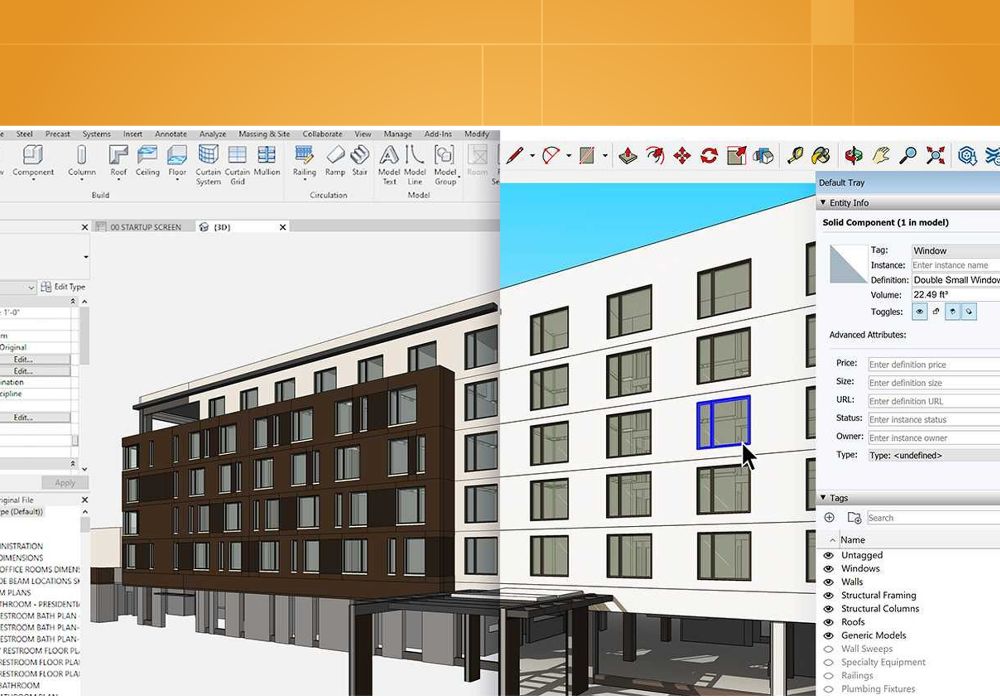
With Revit Importer, you can import Revit models, families, and 3D views into SketchUp. It makes it easier to use existing BIM data and continue working on models in a more flexible 3D environment.
Scan Essentials

With Scan Essentials, you can import, view, and model directly onto point cloud data in SketchUp. It gives you reality-based context as a foundation for planning, coordination, and further design.
Revit Metadata

Import Revit metadata along with the model and keep important BIM information in SketchUp. Revit parameters and classification data can be stored as attributes in imported components and used further in the BIM workflow.
Materials & Textures

Import materials and textures from Revit to SketchUp along with the model. Revit Importer preserves things like material names, colors, texture references, and real texture scale for a more seamless workflow between the programs.
Outliner-Based Components

Organise imported Revit geometry as components in the SketchUp Outliner based on the level structure in the Revit model. It makes it easier to navigate and manage larger imported models.
3D Views Import

Select a specific 3D view from the Revit file and import it into SketchUp with the current view's visibility settings. This gives you better control over which geometry comes into the model.
What's the difference between SketchUp Pro Scan and SketchUp Pro Advanced Workflows?
SketchUp Pro Scan is mainly focused on working with point clouds through Scan Essentials. SketchUp Pro Advanced Workflows also includes Scan Essentials, but adds the Revit Importer and more tools for advanced workflows between different data sources and models. So, it's better suited for teams that need to combine point clouds, Revit files, and 3D modelling in the same project flow.
Do I need to have Revit installed to import Revit files?
The Revit Importer is used directly in SketchUp for Desktop to import Revit files into SketchUp. So you work with the actual .rvt file in the import process.
The importer transfers things like geometry, materials, textures, building levels, tags, and BIM data into the SketchUp model.
Does SketchUp Pro Advanced Workflows work on Mac?
The advanced features for Revit import and point clouds are Windows-based. The Revit Importer is only available for SketchUp for Desktop on Windows, and Scan Essentials requires 64-bit Windows 10 or Windows 11.
If you're unsure whether your current workstations meet the requirements, NTI can help go through the technical details.
Can I choose which information from a Revit model gets imported?
Yes. With the Revit Importer, you can choose which 3D view, construction phases, and categories from the Revit model to import into SketchUp.
This makes it possible to limit the amount of information and create a more relevant SketchUp model for the current workflow.
Can I work with both point clouds and Revit models in the same project?
Yes. SketchUp Pro Advanced Workflows includes both Scan Essentials and Revit Importer.
It makes it possible to use point clouds as a reality-based context while importing Revit data into SketchUp for further modelling, visualisation, and coordination.
How is SketchUp Pro Advanced Workflows different from a standard SketchUp Pro licence?
While SketchUp Pro provides the software platform, Advanced Workflows focuses on optimising how teams use the software through proven processes, integrations, templates, standards, and productivity enhancements.
Want to try SketchUp Pro Advanced Workflows?
SketchUp Pro Advanced Workflows helps you combine point clouds, Revit backgrounds, and intuitive 3D modelling into a more cohesive workflow – from existing conditions to clear models, visualisations, and project documentation. Fill out the form and we’ll help you get started and answer questions about features, licences, and how SketchUp Pro Advanced Workflows can fit into your workflows.
We can help you with:
- Information about trial periods and licence options
- Advice on point clouds, Revit import, and advanced 3D workflows
- Guidance for coordination, visualisation, and project planning using multiple data sources
Questions about SketchUp?
Contact Us

Sales Director
+44 1483 410375