
ProSheets
Snjöll lausn fyrir útflutning og prentun í Autodesk Revit
ProSheets sjálfvirknivæðir útflutning og prentun í Revit og auðveldar þannig gerð verkefnaskjala. Flyttu út PDF-, DWG-, IFC-, NWC-, DWF-, DGN- og myndskrár, margar í einu, og minnkaðu handavinnu um leið og þú tryggir nákvæm og samræmd verkefnaskjöl.

Flýttu fyrir vinnuferlum

Flyttu út eða prentaðu margar Revit-teikningar í einu og sparaðu þannig tíma og endurtekna handavinnu við gerð verkefnaskjala.
Tryggðu samræmd verkefnaskjöl

Samræmdu heiti, útflutningsstillingar og vinnuferla við gerð skjala til að tryggja nákvæm og samræmd verkefnaskjöl hjá öllu teyminu.
Sveigjanlegur útflutningur

Búðu til PDF-, DWG-, IFC-, NWC-, DWF-, DGN- og myndskrár í einu sjálfvirku ferli sem er aðlagað að þörfum verkefnisins.
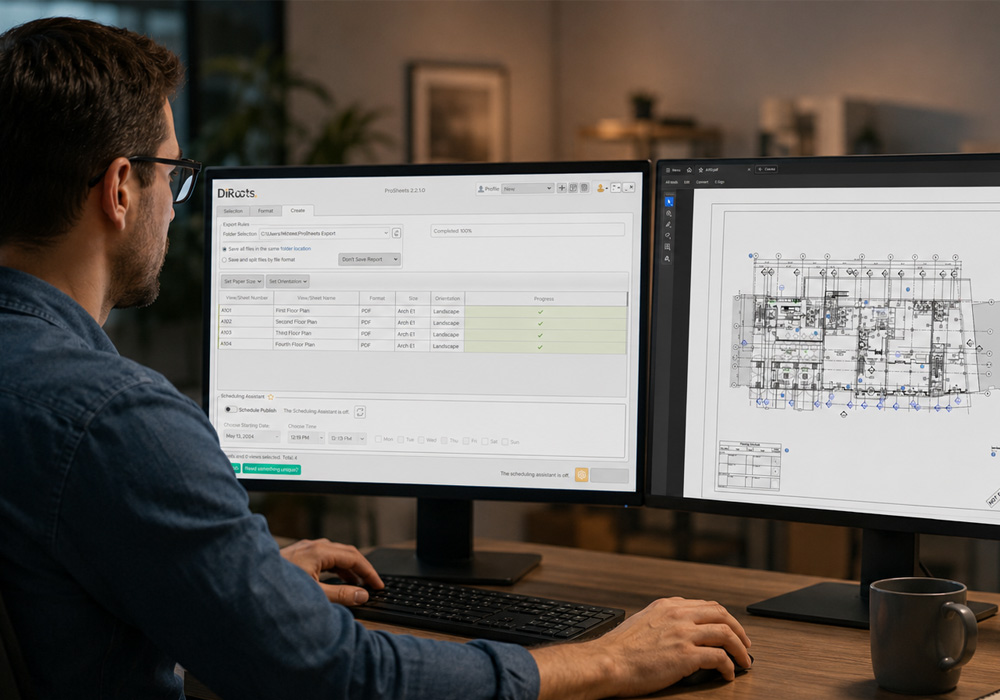
Hannað fyrir fagfólk sem vinnur með verkefnaskjöl
ProSheets er hannað fyrir arkitekta, byggingarverkfræðinga, MEP-verkfræðinga, BIM-samræmingaraðila, BIM-stjórnendur og önnur teymi sem þurfa að útbúa Revit-verkefnaskjöl hratt, nákvæmlega og á samræmdan hátt.
Hvort sem þú vinnur með teikningar, samræmir verkefni eða deilir BIM-líkönum, einfaldar ProSheets útflutning og prentun og dregur úr handavinnu.
ProSheets hentar sérstaklega þeim sem vilja:
- Sjálfvirknivæða prentun og útflutning margra skjala í einu
- Tryggja samræmd verkefnaskjöl hjá öllu teyminu.
- Flytja Revit-teikningar út á mismunandi skráarsnið.
- Minnka handavinnu og draga úr villum í verkefnaskjölum.
- Miðla verkefnaupplýsingum hraðar og á skilvirkari hátt.
Einfaldaðu vinnuna við gerð verkefnaskjala og eyddu meiri tíma í hönnun í stað endurtekinna verkefna við útflutning.
6 helstu kostir ProSheets
ProSheets einfaldar gerð verkefnaskjala í Revit með því að sjálfvirknivæða útflutning, prentun og skráarumsýslu. Þannig geturðu unnið hraðar, tryggt samræmi og dregið úr endurtekinni handavinnu.
Útflutningur og prentun margra skjala í einu

Flyttu út eða prentaðu hundruð Revit-teikninga í einu og sparaðu tíma með því að draga úr endurtekinni handavinnu.
Mismunandi skráarsnið

Búðu til verkefnaskjöl á PDF-, DWG-, DGN-, DWF-, IFC-, NWC- og myndsniði í einu sjálfvirku ferli.
Vistaðar útflutningsstillingar

Vistaðu og endurnýttu útflutningsstillingar til að tryggja samræmd vinnubrögð og sömu gæðakröfur í öllum verkefnum.
Sérsniðin skráarheiti

Búðu til samræmd skráarheiti með því að nota færibreytur verkefnisins, eiginleika teikningablaða og sérsniðnar reglur. Þannig tryggir þú samræmda nafngift á öllum skrám sem eru fluttar út.
Sveigjanlegt skipulag skráa

Skipuleggðu útfluttar skrár sjálfkrafa í sérsniðnar möppur svo auðveldara sé að halda utan um og deila verkefnaskjölum.
Áreiðanleg verkefnaskil

Dragðu úr villum og flýttu fyrir gerð verkefnaskjala með nákvæmum og samræmdum skrám sem eru tilbúnar til afhendingar.



Eru fleiri útgáfur af ProSheets í boði?
Já. ProSheets Premium sjálfvirknivæðir útflutning og prentun í Revit og auðveldar þannig gerð verkefnaskjala. Hægt er að búa til PDF-, DWG-, IFC-, NWC-, DWF-, DGN- og myndskrár, margar í einu, sem sparar tíma og dregur úr handavinnu. Greitt er árlegt áskriftargjald fyrir ProSheets Premium.
ProSheets Fremium er ókeypis útgáfa sem inniheldur alla grunneiginleika ProSheets, en takmarkast við 150 útflutninga á hvern notanda á mánuði. Með því að uppfæra í ProSheets Premium færðu ótakmarkaðan útflutning og aðgang að fleiri eiginleikum.
Get ég fengið kynningu eða ókeypis prufuaðgang?
Við bjóðum upp á 30 daga ókeypis prufuaðgang að öllum eiginleikum ProSheets Premium. Ef þú vilt sjá hvernig ProSheets virkar geta sérfræðingar okkar einnig boðið upp á vörukynningu sem er sniðin að þínum þörfum.
Hvaða útgáfur af Autodesk Revit styður ProSheets?
ProSheets styður Autodesk Revit 2018, 2019, 2020, 2021, 2022, 2023, 2024, 2025, 2026 og 2027 og hentar því bæði fyrir eldri og nýrri Revit-verkefni.
Hvernig virka leyfin og umsýsla þeirra?
ProSheets er með árleg notendaleyfi sem tengjast netfangi hvers notanda. Umsjónaraðilar geta auðveldlega úthlutað leyfum, afturkallað þau eða fært þau á milli notenda eftir þörfum í leyfagáttinni okkar (Licence Management Portal).
Eru pakkalausnir í boði?
ProSheets er í boði sem hluti af nokkrum pakkalausnum ásamt öðrum DiRoots-lausnum, svo sem DiRootsOne, DiStem og IDS4Revit. Pakkalausnirnar eru hagkvæmari en að kaupa hverja lausn fyrir sig.
Get ég notað leyfið mitt bæði í vinnunni og heima?
Hægt er að virkja hvert notendaleyfi á allt að þremur tækjum, sem gefur notandanum sveigjanleika til að vinna bæði á skrifstofunni og annars staðar. Leyfið er bundið við einn tiltekinn notanda og má ekki deila því með öðrum.
Prófaðu ProSheets Premium ókeypis í 30 daga
Fáðu fullan aðgang að ProSheets Premium og kynntu þér alla eiginleika lausnarinnar til að sjá hvernig hún getur einfaldað og bætt daglega vinnuferla í Revit. Prufuaðgangurinn er ókeypis í 30 daga og ekki þarf að skrá greiðslukort.
Þegar þú skráir þig færðu:
- Tölvupóst frá NTI með hlekk til að hlaða niður og setja upp hugbúnaðinn.
- Sérstakan tölvupóst frá DiRoots-teyminu (í gegnum LicenseSpring) með innskráningarupplýsingum sem veita þér aðgang að öllum Premium-eiginleikum á prufutímabilinu..
Þegar prufutímabilið nálgast lok færðu tilkynningu beint í hugbúnaðinum svo þú hafir nægan tíma til að ákveða næstu skref.
Ókeypis prufuútgáfa
Hafðu samband við okkur ef þú hefur einhverjar spurningar.

Sölustjóri NTI á Íslandi
Reykjavík - Ísland
+354 537 1945